Source Code Editor
Overview
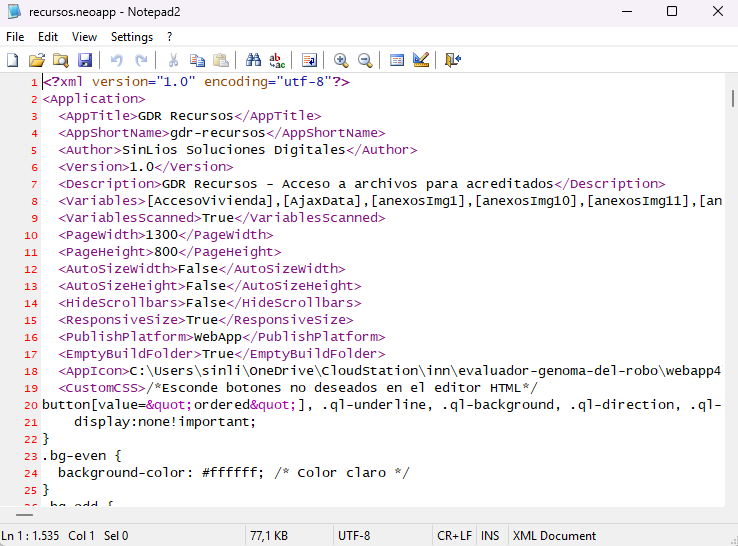
The Source File Editor is a powerful tool for advanced users that allows direct editing of the .neoapp file in XML format. This tool provides complete control over the application's structure and settings, making it ideal for developers who need to tweak configurations, troubleshoot issues, or implement features not accessible through the VisualNEO Web graphical interface.
Key Features
- Direct Access to Application Source:
- Opens the .neoapp file currently in use, allowing you to view and modify its raw XML structure.
- XML Code Editing:
- Modify any aspect of the application, including page definitions, custom CSS, embedded variables, and configuration settings.
- Advanced Customization:
- Customize elements beyond what is possible in the visual editor, such as moving a page from one project to another or integrating unsupported features.
- Syntax Highlighting:
- Displays the XML file in a structured and readable format for easier navigation and editing.
How to Use the Source File Editor
- Open the Source File:
- Access the Source File Editor from the Tools menu in VisualNEO Web.
- The .neoapp file for your project will be loaded into the editor.
- Edit the XML:
- Use the code editor to make changes to the application’s XML structure.
- Examples of edits include:
- Adding or modifying application metadata directly (e.g., AppTitle, Description).
- Adjusting PageWidth and PageHeight values for custom layouts.
- Embedding custom CSS or JavaScript under the <CustomCSS> or <CustomCode> tags.
- Much more.
- Save Changes:
- After editing, save the .neoapp file directly from the editor.
- Ensure the file is valid XML to avoid errors during application execution.
- Close and reopen the app in VisualNEO Web
- Test Your Application:
- Run your application in VisualNEO Web to verify that the changes work as expected.
Best Practices
- Backup First:
- Always create a backup of your .neoapp file before making direct edits to prevent data loss.
- Validate XML:
- Ensure that the structure and syntax of your XML are correct to avoid runtime errors.
- Use for Advanced Features:
- The Source File Editor is best suited for experienced users familiar with XML and VisualNEO Web’s application structure.
Warning
Editing the source file is a powerful feature, but improper changes can break your application. Always proceed with caution and ensure you have the necessary knowledge to make the desired modifications.
Created with the Personal Edition of HelpNDoc: Keep Your Sensitive PDFs Safe with These Easy Security Measures